> ## Documentation Index
> Fetch the complete documentation index at: https://docs.headlesscommerce.io/llms.txt
> Use this file to discover all available pages before exploring further.
# Introduction
> Headless Commerce — A complete REST API for products, carts, checkout, and order management. Build any storefront with any framework.
# The commerce backend you don't have to build
Products, carts, checkout, orders, customers, inventory — all through a single REST API.
Focus on your storefront. We handle the commerce.
 Connect your AI agent (Claude, Cursor, ChatGPT) to manage your store with natural language.
Explore 100+ endpoints across Storefront and Admin APIs.
***
## Vibe Coding — Copy this prompt to your AI agent
```text theme={null}
You are a developer building an e-commerce application using the Headless Commerce API.
## API Overview
- Base URL: https://api.headlesscommerce.io/v1
- Auth: Authorization: Bearer {API_KEY}
- Storefront API (pk_* keys): customer-facing — products, carts, checkout, orders
- Admin API (sk_* keys): server-side — product management, orders, inventory, webhooks
- Key types: pk_test_* (dev frontend), pk_live_* (prod frontend), sk_test_* (dev backend), sk_live_* (prod backend)
- NEVER expose sk_* keys in client-side code
## SDK Installation
npm install @headless-commerce/sdk # TypeScript
pip install headless-commerce # Python
## SDK Initialization
// TypeScript — Storefront (client-safe)
import { createStorefrontClient } from '@headless-commerce/sdk';
const client = createStorefrontClient({ apiKey: 'pk_test_...' });
// TypeScript — Admin (server-only)
import { createAdminClient } from '@headless-commerce/sdk';
const admin = createAdminClient({ apiKey: 'sk_test_...' });
# Python
from headless_commerce import HeadlessCommerce
client = HeadlessCommerce(api_key="pk_test_...")
admin = HeadlessCommerce(api_key="sk_test_...")
## Core Flow: Products → Cart → Checkout
1. List products: const { data } = await client.products.list({ limit: 20 })
2. Create cart: const cart = await client.carts.create({ session_id: 'guest-123' })
3. Add item: await client.carts.addItem(cart.id, { variant_id: 'var_xxx', quantity: 1 })
4. Checkout: const order = await client.carts.checkout(cart.id, {
email: 'customer@example.com',
shipping_address: { line1: '123 Main St', city: 'Seoul', country: 'KR' },
payment_method: 'stripe' // or 'tosspayments', 'manual'
})
## Payment Integration
- Stripe: payment_method: 'stripe' → returns client_secret → confirm with Stripe.js on client
- TossPayments: payment_method: 'tosspayments' → returns toss_payment → confirm with TossPayments Widget SDK
## Webhooks
- Create: POST /admin/webhooks { url, events: ['order.confirmed', 'payment.completed'] }
- Verify: HMAC-SHA256 signature in X-Webhook-Signature header
- Events: order.created, order.confirmed, order.completed, order.cancelled, payment.completed, payment.failed, payment.refunded, product.created, product.updated, product.deleted, fulfillment.created, fulfillment.shipped, fulfillment.delivered, inventory.low, inventory.out_of_stock, customer.created
## Customer Authentication
- Server generates JWT: POST /admin/customers/{id}/token → { token, expires_at }
- Client passes: X-Customer-Token: {jwt} alongside Authorization: Bearer pk_*
- Guest carts: create with session_id, merge after login via POST /carts/{id}/merge
## Key Patterns
- Pagination: cursor-based with limit (1-100, default 20) and starting_after
- Errors: JSON { error: { type, code, message, details } } with standard HTTP status codes
- Idempotency: Idempotency-Key header (UUID) on checkout/payment/refund POSTs, cached 24h
## MCP Server (Direct AI Agent Connection)
URL: https://mcp.headlesscommerce.io/mcp
Header: Authorization: Bearer sk_live_your_key
Supports: products, orders, customers, inventory, discounts, fulfillments, carts, webhooks, regions, shipping, returns, refunds, store settings, dashboard stats
## Full API Docs: https://docs.headlesscommerce.io
## API Reference: https://docs.headlesscommerce.io/api-reference/introduction
Use this context to implement whatever the user requests. Write clean, production-ready code.
```
***
## Platform at a glance
**API endpoints** across Storefront & Admin
**Transaction fees** — you keep your revenue
**Median API latency** globally
**Uptime SLA** on paid plans
***
## Start building in 60 seconds
1. Sign in to the [Dashboard](https://app.headlesscommerce.io)
2. Go to **Settings > API Keys**
3. Click **Create API Key**
| Key prefix | Type | Use for |
| ----------- | ------------------ | ------------------------------------------------- |
| `pk_test_*` | Publishable / Test | Development frontends (safe to expose in browser) |
| `pk_live_*` | Publishable / Live | Production frontends |
| `sk_test_*` | Secret / Test | Development backend / admin |
| `sk_live_*` | Secret / Live | Production backend / admin |
Never expose secret keys (`sk_*`) in client-side code. Use publishable keys for browser and mobile applications.
```bash npm theme={null}
npm install @headless-commerce/sdk
```
```bash pnpm theme={null}
pnpm add @headless-commerce/sdk
```
```bash yarn theme={null}
yarn add @headless-commerce/sdk
```
```bash pip theme={null}
pip install headless-commerce
```
```bash poetry theme={null}
poetry add headless-commerce
```
```bash uv theme={null}
uv add headless-commerce
```
Set your environment variables:
```bash .env theme={null}
# Storefront (client-safe)
NEXT_PUBLIC_HC_API_KEY=pk_test_...
# Admin (server-only)
HC_SECRET_KEY=sk_test_...
```
```typescript theme={null}
import { createStorefrontClient } from '@headless-commerce/sdk';
const client = createStorefrontClient({
apiKey: process.env.NEXT_PUBLIC_HC_API_KEY!,
// connects to https://api.headlesscommerce.io/v1 by default
});
```
For admin operations, use a secret key on the server side:
```typescript theme={null}
import { createAdminClient } from '@headless-commerce/sdk';
const admin = createAdminClient({
apiKey: process.env.HC_SECRET_KEY!,
});
```
```python theme={null}
from headless_commerce import HeadlessCommerce
# Storefront client
client = HeadlessCommerce(api_key="pk_test_...")
# Admin client
admin = HeadlessCommerce(api_key="sk_test_...")
```
Or use a context manager for automatic cleanup:
```python theme={null}
with HeadlessCommerce(api_key="sk_test_...") as admin:
products = admin.products.list()
```
**List Products**
```typescript TypeScript theme={null}
const { data: products } = await client.products.list({ limit: 10 });
console.log(products);
```
```python Python theme={null}
products = client.products.list(limit=10)
print(products)
```
```bash cURL theme={null}
curl https://api.headlesscommerce.io/v1/storefront/products \
-H "Authorization: Bearer pk_test_your_key_here"
```
```json Example response theme={null}
{
"data": [
{
"id": "prod_abc123",
"name": "Classic T-Shirt",
"status": "active",
"type": "physical",
"variants": [
{ "id": "var_xxx", "name": "M / Black", "price": 2900 }
]
}
],
"has_more": false,
"next_cursor": null
}
```
**Create a Cart**
```typescript TypeScript theme={null}
const cart = await client.carts.create({
session_id: 'guest-session-123',
});
console.log(cart.id); // cart_xxxxxxxx
```
```python Python theme={null}
cart = client.carts.create(session_id="guest-session-123")
print(cart["id"]) # cart_xxxxxxxx
```
```bash cURL theme={null}
curl -X POST https://api.headlesscommerce.io/v1/storefront/carts \
-H "Authorization: Bearer pk_test_your_key_here" \
-H "Content-Type: application/json" \
-d '{"session_id": "guest-session-123"}'
```
**Add an Item**
```typescript TypeScript theme={null}
await client.carts.addItem(cart.id, {
variant_id: products[0].variants[0].id,
quantity: 1,
});
```
```python Python theme={null}
client.carts.add_item(cart["id"], variant_id=products[0]["variants"][0]["id"], quantity=1)
```
```bash cURL theme={null}
curl -X POST https://api.headlesscommerce.io/v1/storefront/carts/{cart_id}/items \
-H "Authorization: Bearer pk_test_your_key_here" \
-H "Content-Type: application/json" \
-d '{"variant_id": "var_xxx", "quantity": 1}'
```
**Checkout**
```typescript Stripe theme={null}
const order = await client.carts.checkout(cart.id, {
email: 'customer@example.com',
shipping_address: { line1: '123 Main St', city: 'Seoul', country: 'KR' },
payment_method: 'stripe',
});
// Use order.payment.client_secret with Stripe.js to complete payment
console.log(order.payment.client_secret);
```
```typescript TossPayments theme={null}
const order = await client.carts.checkout(cart.id, {
email: 'customer@example.com',
shipping_address: { line1: '123 Main St', city: 'Seoul', country: 'KR' },
payment_method: 'tosspayments',
});
// Use order.toss_payment with TossPayments SDK to show payment UI
const { order_id, order_name, amount } = order.toss_payment;
// After user completes payment in TossPayments UI, confirm server-side:
await client.payments.confirm({
payment_key: paymentKey, // from TossPayments SDK callback
order_id,
amount,
});
```
```bash cURL theme={null}
curl -X POST https://api.headlesscommerce.io/v1/storefront/carts/{cart_id}/checkout \
-H "Authorization: Bearer pk_test_your_key_here" \
-H "Content-Type: application/json" \
-d '{
"email": "customer@example.com",
"payment_provider": "stripe",
"payment_method_id": "pm_xxx"
}'
```
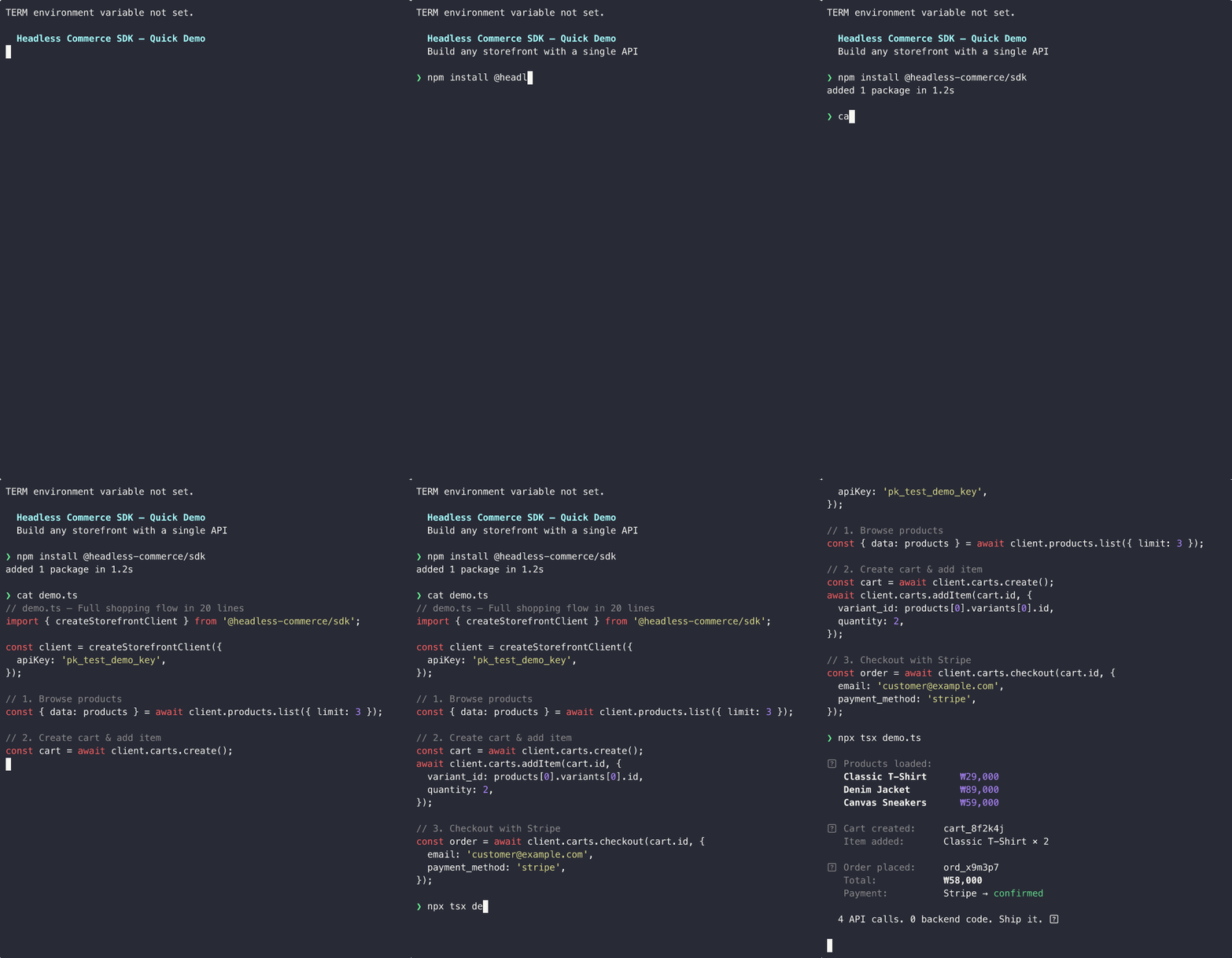
That's it — four steps from browsing to a completed order.
***
## Built for developers
**Storefront API** for customer-facing apps with publishable keys.
**Admin API** for back-office management with secret keys.
Same base URL, different scopes.
First-class TypeScript SDK with full autocompletion.
Install `@headless-commerce/sdk` and start building with type safety out of the box.
Subscribe to real-time events — order placed, payment completed, inventory changed.
Build reactive workflows without polling.
Manage products, orders, customers, and inventory from a full-featured admin dashboard — no extra setup.
Connect your store to AI assistants like Claude. Manage products, orders, and inventory through natural language.
Built-in Stripe and TossPayments support. Accept payments globally with zero platform fees on top.
***
## What's included
| Domain | Storefront API | Admin API |
| ------------------------ | :------------: | :-------------: |
| Products & Variants | Read | Full CRUD |
| Categories & Collections | Read | Full CRUD |
| Cart & Checkout | Full | — |
| Orders & Returns | Read own | Full management |
| Customers & Addresses | Self-service | Full CRUD |
| Inventory | — | Full management |
| Discounts | Apply to cart | Full CRUD |
| Webhooks | — | Full CRUD |
| Payments (Stripe, Toss) | Confirm | Complete |
| Regions & i18n | Read | Full CRUD |
| CSV Import/Export | — | Full |
***
## Works with any framework
Build your storefront with the tools you already know. Headless Commerce is a pure API — no opinions on your frontend.
React Server Components, App Router, SSR/SSG — all supported.
Loaders, actions, nested routes — fetch from Headless Commerce anywhere.
Vue 3 composables with full TypeScript support via the SDK.
Svelte, Astro, mobile apps, or plain REST — if it speaks HTTP, it works.
***
## Next Steps
Connect AI agents to manage your store with natural language.
TypeScript and Python SDK reference with all resources and methods.
JWT tokens, guest carts, and customer identity.
Explore 100+ REST endpoints across Storefront and Admin APIs.
No credit card required. Full API access in test mode.
Simple, predictable pricing. Zero transaction fees.
Connect your AI agent (Claude, Cursor, ChatGPT) to manage your store with natural language.
Explore 100+ endpoints across Storefront and Admin APIs.
***
## Vibe Coding — Copy this prompt to your AI agent
```text theme={null}
You are a developer building an e-commerce application using the Headless Commerce API.
## API Overview
- Base URL: https://api.headlesscommerce.io/v1
- Auth: Authorization: Bearer {API_KEY}
- Storefront API (pk_* keys): customer-facing — products, carts, checkout, orders
- Admin API (sk_* keys): server-side — product management, orders, inventory, webhooks
- Key types: pk_test_* (dev frontend), pk_live_* (prod frontend), sk_test_* (dev backend), sk_live_* (prod backend)
- NEVER expose sk_* keys in client-side code
## SDK Installation
npm install @headless-commerce/sdk # TypeScript
pip install headless-commerce # Python
## SDK Initialization
// TypeScript — Storefront (client-safe)
import { createStorefrontClient } from '@headless-commerce/sdk';
const client = createStorefrontClient({ apiKey: 'pk_test_...' });
// TypeScript — Admin (server-only)
import { createAdminClient } from '@headless-commerce/sdk';
const admin = createAdminClient({ apiKey: 'sk_test_...' });
# Python
from headless_commerce import HeadlessCommerce
client = HeadlessCommerce(api_key="pk_test_...")
admin = HeadlessCommerce(api_key="sk_test_...")
## Core Flow: Products → Cart → Checkout
1. List products: const { data } = await client.products.list({ limit: 20 })
2. Create cart: const cart = await client.carts.create({ session_id: 'guest-123' })
3. Add item: await client.carts.addItem(cart.id, { variant_id: 'var_xxx', quantity: 1 })
4. Checkout: const order = await client.carts.checkout(cart.id, {
email: 'customer@example.com',
shipping_address: { line1: '123 Main St', city: 'Seoul', country: 'KR' },
payment_method: 'stripe' // or 'tosspayments', 'manual'
})
## Payment Integration
- Stripe: payment_method: 'stripe' → returns client_secret → confirm with Stripe.js on client
- TossPayments: payment_method: 'tosspayments' → returns toss_payment → confirm with TossPayments Widget SDK
## Webhooks
- Create: POST /admin/webhooks { url, events: ['order.confirmed', 'payment.completed'] }
- Verify: HMAC-SHA256 signature in X-Webhook-Signature header
- Events: order.created, order.confirmed, order.completed, order.cancelled, payment.completed, payment.failed, payment.refunded, product.created, product.updated, product.deleted, fulfillment.created, fulfillment.shipped, fulfillment.delivered, inventory.low, inventory.out_of_stock, customer.created
## Customer Authentication
- Server generates JWT: POST /admin/customers/{id}/token → { token, expires_at }
- Client passes: X-Customer-Token: {jwt} alongside Authorization: Bearer pk_*
- Guest carts: create with session_id, merge after login via POST /carts/{id}/merge
## Key Patterns
- Pagination: cursor-based with limit (1-100, default 20) and starting_after
- Errors: JSON { error: { type, code, message, details } } with standard HTTP status codes
- Idempotency: Idempotency-Key header (UUID) on checkout/payment/refund POSTs, cached 24h
## MCP Server (Direct AI Agent Connection)
URL: https://mcp.headlesscommerce.io/mcp
Header: Authorization: Bearer sk_live_your_key
Supports: products, orders, customers, inventory, discounts, fulfillments, carts, webhooks, regions, shipping, returns, refunds, store settings, dashboard stats
## Full API Docs: https://docs.headlesscommerce.io
## API Reference: https://docs.headlesscommerce.io/api-reference/introduction
Use this context to implement whatever the user requests. Write clean, production-ready code.
```
***
## Platform at a glance
**API endpoints** across Storefront & Admin
**Transaction fees** — you keep your revenue
**Median API latency** globally
**Uptime SLA** on paid plans
***
## Start building in 60 seconds
1. Sign in to the [Dashboard](https://app.headlesscommerce.io)
2. Go to **Settings > API Keys**
3. Click **Create API Key**
| Key prefix | Type | Use for |
| ----------- | ------------------ | ------------------------------------------------- |
| `pk_test_*` | Publishable / Test | Development frontends (safe to expose in browser) |
| `pk_live_*` | Publishable / Live | Production frontends |
| `sk_test_*` | Secret / Test | Development backend / admin |
| `sk_live_*` | Secret / Live | Production backend / admin |
Never expose secret keys (`sk_*`) in client-side code. Use publishable keys for browser and mobile applications.
```bash npm theme={null}
npm install @headless-commerce/sdk
```
```bash pnpm theme={null}
pnpm add @headless-commerce/sdk
```
```bash yarn theme={null}
yarn add @headless-commerce/sdk
```
```bash pip theme={null}
pip install headless-commerce
```
```bash poetry theme={null}
poetry add headless-commerce
```
```bash uv theme={null}
uv add headless-commerce
```
Set your environment variables:
```bash .env theme={null}
# Storefront (client-safe)
NEXT_PUBLIC_HC_API_KEY=pk_test_...
# Admin (server-only)
HC_SECRET_KEY=sk_test_...
```
```typescript theme={null}
import { createStorefrontClient } from '@headless-commerce/sdk';
const client = createStorefrontClient({
apiKey: process.env.NEXT_PUBLIC_HC_API_KEY!,
// connects to https://api.headlesscommerce.io/v1 by default
});
```
For admin operations, use a secret key on the server side:
```typescript theme={null}
import { createAdminClient } from '@headless-commerce/sdk';
const admin = createAdminClient({
apiKey: process.env.HC_SECRET_KEY!,
});
```
```python theme={null}
from headless_commerce import HeadlessCommerce
# Storefront client
client = HeadlessCommerce(api_key="pk_test_...")
# Admin client
admin = HeadlessCommerce(api_key="sk_test_...")
```
Or use a context manager for automatic cleanup:
```python theme={null}
with HeadlessCommerce(api_key="sk_test_...") as admin:
products = admin.products.list()
```
**List Products**
```typescript TypeScript theme={null}
const { data: products } = await client.products.list({ limit: 10 });
console.log(products);
```
```python Python theme={null}
products = client.products.list(limit=10)
print(products)
```
```bash cURL theme={null}
curl https://api.headlesscommerce.io/v1/storefront/products \
-H "Authorization: Bearer pk_test_your_key_here"
```
```json Example response theme={null}
{
"data": [
{
"id": "prod_abc123",
"name": "Classic T-Shirt",
"status": "active",
"type": "physical",
"variants": [
{ "id": "var_xxx", "name": "M / Black", "price": 2900 }
]
}
],
"has_more": false,
"next_cursor": null
}
```
**Create a Cart**
```typescript TypeScript theme={null}
const cart = await client.carts.create({
session_id: 'guest-session-123',
});
console.log(cart.id); // cart_xxxxxxxx
```
```python Python theme={null}
cart = client.carts.create(session_id="guest-session-123")
print(cart["id"]) # cart_xxxxxxxx
```
```bash cURL theme={null}
curl -X POST https://api.headlesscommerce.io/v1/storefront/carts \
-H "Authorization: Bearer pk_test_your_key_here" \
-H "Content-Type: application/json" \
-d '{"session_id": "guest-session-123"}'
```
**Add an Item**
```typescript TypeScript theme={null}
await client.carts.addItem(cart.id, {
variant_id: products[0].variants[0].id,
quantity: 1,
});
```
```python Python theme={null}
client.carts.add_item(cart["id"], variant_id=products[0]["variants"][0]["id"], quantity=1)
```
```bash cURL theme={null}
curl -X POST https://api.headlesscommerce.io/v1/storefront/carts/{cart_id}/items \
-H "Authorization: Bearer pk_test_your_key_here" \
-H "Content-Type: application/json" \
-d '{"variant_id": "var_xxx", "quantity": 1}'
```
**Checkout**
```typescript Stripe theme={null}
const order = await client.carts.checkout(cart.id, {
email: 'customer@example.com',
shipping_address: { line1: '123 Main St', city: 'Seoul', country: 'KR' },
payment_method: 'stripe',
});
// Use order.payment.client_secret with Stripe.js to complete payment
console.log(order.payment.client_secret);
```
```typescript TossPayments theme={null}
const order = await client.carts.checkout(cart.id, {
email: 'customer@example.com',
shipping_address: { line1: '123 Main St', city: 'Seoul', country: 'KR' },
payment_method: 'tosspayments',
});
// Use order.toss_payment with TossPayments SDK to show payment UI
const { order_id, order_name, amount } = order.toss_payment;
// After user completes payment in TossPayments UI, confirm server-side:
await client.payments.confirm({
payment_key: paymentKey, // from TossPayments SDK callback
order_id,
amount,
});
```
```bash cURL theme={null}
curl -X POST https://api.headlesscommerce.io/v1/storefront/carts/{cart_id}/checkout \
-H "Authorization: Bearer pk_test_your_key_here" \
-H "Content-Type: application/json" \
-d '{
"email": "customer@example.com",
"payment_provider": "stripe",
"payment_method_id": "pm_xxx"
}'
```
That's it — four steps from browsing to a completed order.
***
## Built for developers
**Storefront API** for customer-facing apps with publishable keys.
**Admin API** for back-office management with secret keys.
Same base URL, different scopes.
First-class TypeScript SDK with full autocompletion.
Install `@headless-commerce/sdk` and start building with type safety out of the box.
Subscribe to real-time events — order placed, payment completed, inventory changed.
Build reactive workflows without polling.
Manage products, orders, customers, and inventory from a full-featured admin dashboard — no extra setup.
Connect your store to AI assistants like Claude. Manage products, orders, and inventory through natural language.
Built-in Stripe and TossPayments support. Accept payments globally with zero platform fees on top.
***
## What's included
| Domain | Storefront API | Admin API |
| ------------------------ | :------------: | :-------------: |
| Products & Variants | Read | Full CRUD |
| Categories & Collections | Read | Full CRUD |
| Cart & Checkout | Full | — |
| Orders & Returns | Read own | Full management |
| Customers & Addresses | Self-service | Full CRUD |
| Inventory | — | Full management |
| Discounts | Apply to cart | Full CRUD |
| Webhooks | — | Full CRUD |
| Payments (Stripe, Toss) | Confirm | Complete |
| Regions & i18n | Read | Full CRUD |
| CSV Import/Export | — | Full |
***
## Works with any framework
Build your storefront with the tools you already know. Headless Commerce is a pure API — no opinions on your frontend.
React Server Components, App Router, SSR/SSG — all supported.
Loaders, actions, nested routes — fetch from Headless Commerce anywhere.
Vue 3 composables with full TypeScript support via the SDK.
Svelte, Astro, mobile apps, or plain REST — if it speaks HTTP, it works.
***
## Next Steps
Connect AI agents to manage your store with natural language.
TypeScript and Python SDK reference with all resources and methods.
JWT tokens, guest carts, and customer identity.
Explore 100+ REST endpoints across Storefront and Admin APIs.
No credit card required. Full API access in test mode.
Simple, predictable pricing. Zero transaction fees.