
The commerce backend you don’t have to build

Products, carts, checkout, orders, customers, inventory — all through a single REST API. Focus on your storefront. We handle the commerce.
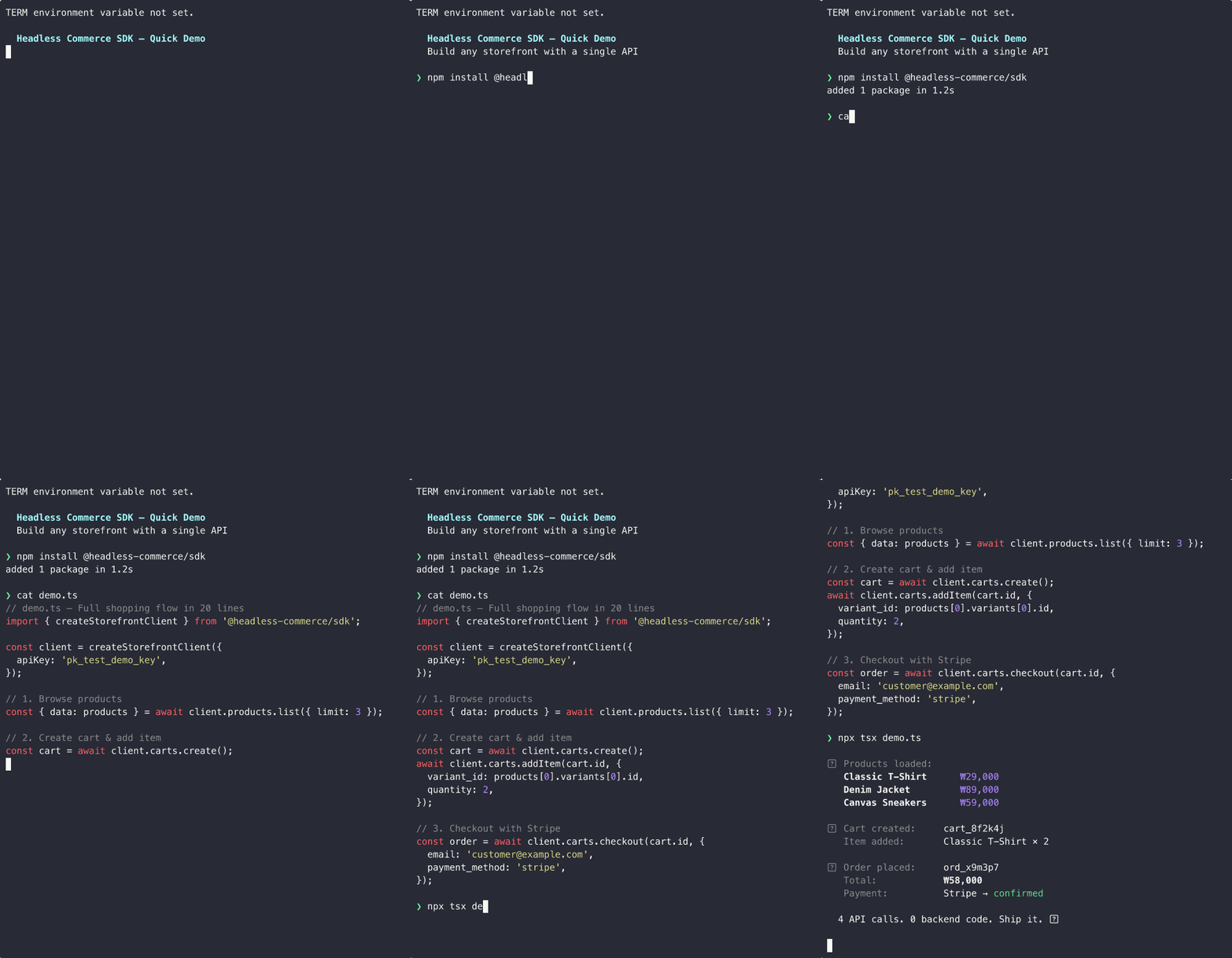
Headless Commerce SDK Demo — Install, code, and ship in 60 seconds

MCP Server

Connect your AI agent (Claude, Cursor, ChatGPT) to manage your store with natural language.

API Reference

Explore 100+ endpoints across Storefront and Admin APIs.

Vibe Coding — Copy this prompt to your AI agent

You are a developer building an e-commerce application using the Headless Commerce API.

## API Overview
- Base URL: https://api.headlesscommerce.io/v1
- Auth: Authorization: Bearer {API_KEY}
- Storefront API (pk_* keys): customer-facing — products, carts, checkout, orders
- Admin API (sk_* keys): server-side — product management, orders, inventory, webhooks
- Key types: pk_test_* (dev frontend), pk_live_* (prod frontend), sk_test_* (dev backend), sk_live_* (prod backend)
- NEVER expose sk_* keys in client-side code

## SDK Installation
npm install @headless-commerce/sdk    # TypeScript
pip install headless-commerce          # Python

## SDK Initialization
// TypeScript — Storefront (client-safe)
import { createStorefrontClient } from '@headless-commerce/sdk';
const client = createStorefrontClient({ apiKey: 'pk_test_...' });

// TypeScript — Admin (server-only)
import { createAdminClient } from '@headless-commerce/sdk';
const admin = createAdminClient({ apiKey: 'sk_test_...' });

# Python
from headless_commerce import HeadlessCommerce
client = HeadlessCommerce(api_key="pk_test_...")
admin = HeadlessCommerce(api_key="sk_test_...")

## Core Flow: Products → Cart → Checkout
1. List products:     const { data } = await client.products.list({ limit: 20 })
2. Create cart:       const cart = await client.carts.create({ session_id: 'guest-123' })
3. Add item:          await client.carts.addItem(cart.id, { variant_id: 'var_xxx', quantity: 1 })
4. Checkout:          const order = await client.carts.checkout(cart.id, {
                        email: 'customer@example.com',
                        shipping_address: { line1: '123 Main St', city: 'Seoul', country: 'KR' },
                        payment_method: 'stripe'  // or 'tosspayments', 'manual'
                      })

## Payment Integration
- Stripe: payment_method: 'stripe' → returns client_secret → confirm with Stripe.js on client
- TossPayments: payment_method: 'tosspayments' → returns toss_payment → confirm with TossPayments Widget SDK

## Webhooks
- Create: POST /admin/webhooks { url, events: ['order.confirmed', 'payment.completed'] }
- Verify: HMAC-SHA256 signature in X-Webhook-Signature header
- Events: order.created, order.confirmed, order.completed, order.cancelled, payment.completed, payment.failed, payment.refunded, product.created, product.updated, product.deleted, fulfillment.created, fulfillment.shipped, fulfillment.delivered, inventory.low, inventory.out_of_stock, customer.created

## Customer Authentication
- Server generates JWT: POST /admin/customers/{id}/token → { token, expires_at }
- Client passes: X-Customer-Token: {jwt} alongside Authorization: Bearer pk_*
- Guest carts: create with session_id, merge after login via POST /carts/{id}/merge

## Key Patterns
- Pagination: cursor-based with limit (1-100, default 20) and starting_after
- Errors: JSON { error: { type, code, message, details } } with standard HTTP status codes
- Idempotency: Idempotency-Key header (UUID) on checkout/payment/refund POSTs, cached 24h

## MCP Server (Direct AI Agent Connection)
URL: https://mcp.headlesscommerce.io/mcp
Header: Authorization: Bearer sk_live_your_key
Supports: products, orders, customers, inventory, discounts, fulfillments, carts, webhooks, regions, shipping, returns, refunds, store settings, dashboard stats

## Full API Docs: https://docs.headlesscommerce.io
## API Reference: https://docs.headlesscommerce.io/api-reference/introduction

Use this context to implement whatever the user requests. Write clean, production-ready code.

Platform at a glance

100+

API endpoints across Storefront & Admin

0%

Transaction fees — you keep your revenue

<50ms

Median API latency globally

99.9%

Uptime SLA on paid plans

Start building in 60 seconds

1

Get your API keys

  1. Sign in to the Dashboard
  2. Go to Settings > API Keys
  3. Click Create API Key
Key prefixTypeUse for
pk_test_*Publishable / TestDevelopment frontends (safe to expose in browser)
pk_live_*Publishable / LiveProduction frontends
sk_test_*Secret / TestDevelopment backend / admin
sk_live_*Secret / LiveProduction backend / admin
Never expose secret keys (sk_*) in client-side code. Use publishable keys for browser and mobile applications.
2

Install the SDK

npm install @headless-commerce/sdk
3

Initialize the client

Set your environment variables:
.env
# Storefront (client-safe)
NEXT_PUBLIC_HC_API_KEY=pk_test_...

# Admin (server-only)
HC_SECRET_KEY=sk_test_...
import { createStorefrontClient } from '@headless-commerce/sdk';

const client = createStorefrontClient({
  apiKey: process.env.NEXT_PUBLIC_HC_API_KEY!,
  // connects to https://api.headlesscommerce.io/v1 by default
});
For admin operations, use a secret key on the server side:
import { createAdminClient } from '@headless-commerce/sdk';

const admin = createAdminClient({
  apiKey: process.env.HC_SECRET_KEY!,
});
4

Build your first shopping flow

List Products
const { data: products } = await client.products.list({ limit: 10 });
console.log(products);
Example response
{
  "data": [
    {
      "id": "prod_abc123",
      "name": "Classic T-Shirt",
      "status": "active",
      "type": "physical",
      "variants": [
        { "id": "var_xxx", "name": "M / Black", "price": 2900 }
      ]
    }
  ],
  "has_more": false,
  "next_cursor": null
}
Create a Cart
const cart = await client.carts.create({
  session_id: 'guest-session-123',
});

console.log(cart.id); // cart_xxxxxxxx
Add an Item
await client.carts.addItem(cart.id, {
  variant_id: products[0].variants[0].id,
  quantity: 1,
});
Checkout
const order = await client.carts.checkout(cart.id, {
  email: 'customer@example.com',
  shipping_address: { line1: '123 Main St', city: 'Seoul', country: 'KR' },
  payment_method: 'stripe',
});

// Use order.payment.client_secret with Stripe.js to complete payment
console.log(order.payment.client_secret);
That’s it — four steps from browsing to a completed order.

Built for developers

Two APIs, one platform

Storefront API for customer-facing apps with publishable keys. Admin API for back-office management with secret keys. Same base URL, different scopes.

Type-safe SDK

First-class TypeScript SDK with full autocompletion. Install @headless-commerce/sdk and start building with type safety out of the box.

Webhooks & Events

Subscribe to real-time events — order placed, payment completed, inventory changed. Build reactive workflows without polling.

Dashboard included

Manage products, orders, customers, and inventory from a full-featured admin dashboard — no extra setup.

MCP Server

Connect your store to AI assistants like Claude. Manage products, orders, and inventory through natural language.

Payments ready

Built-in Stripe and TossPayments support. Accept payments globally with zero platform fees on top.

What’s included

DomainStorefront APIAdmin API
Products & VariantsReadFull CRUD
Categories & CollectionsReadFull CRUD
Cart & CheckoutFull
Orders & ReturnsRead ownFull management
Customers & AddressesSelf-serviceFull CRUD
InventoryFull management
DiscountsApply to cartFull CRUD
WebhooksFull CRUD
Payments (Stripe, Toss)ConfirmComplete
Regions & i18nReadFull CRUD
CSV Import/ExportFull

Works with any framework

Build your storefront with the tools you already know. Headless Commerce is a pure API — no opinions on your frontend.
nextjs

Next.js

React Server Components, App Router, SSR/SSG — all supported.
remix

Remix

Loaders, actions, nested routes — fetch from Headless Commerce anywhere.
nuxt

Nuxt

Vue 3 composables with full TypeScript support via the SDK.
svelte

Svelte & more

Svelte, Astro, mobile apps, or plain REST — if it speaks HTTP, it works.

Next Steps

MCP Server

Connect AI agents to manage your store with natural language.

SDKs

TypeScript and Python SDK reference with all resources and methods.

Customer Authentication

JWT tokens, guest carts, and customer identity.

API Reference

Explore 100+ REST endpoints across Storefront and Admin APIs.

Start for free

No credit card required. Full API access in test mode.

View pricing

Simple, predictable pricing. Zero transaction fees.